



Victron GX and monitoring products tie a Victron system together. Every Smart product already talks to the free VictronConnect app over Bluetooth. A GX device goes further: it collects data from every connected product, coordinates charging, runs automations like generator start, and uploads everything to VRM, Victron’s free remote monitoring portal.
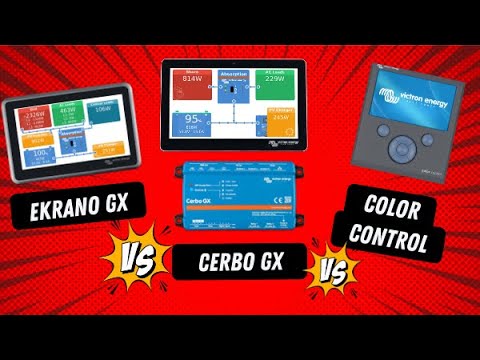
The Three Layers of Victron GX and Monitoring
| Layer | What it is | Cost | Needs internet? |
|---|---|---|---|
| VictronConnect | Phone/ | Free | No |
| GX device | Cerbo GX MK2 (box + optional screen) or Ekrano GX (built-in screen) running Venus OS | Paid hardware | No for local use |
| VRM portal | Web and app dashboard with history, alarms and remote settings | Free | Yes, via the GX device |
Cerbo GX vs Ekrano GX
| Feature | Cerbo GX MK2 | Ekrano GX |
|---|---|---|
| Screen | Optional GX Touch 50 or 70, waterproof, one cable | Built-in 7-inch touchscreen |
| Mounting | Box near the batteries, DIN-rail mountable | Panel mount at the dashboard |
| Processor | Dual-core | Quad-core |
| Tank and temperature inputs | Yes | Yes |
| Generator auto start/stop | Yes | Yes |
| Wi-Fi access point | Yes | Yes |
| MFD / NMEA 2000 | Yes | Yes |
Sources: Victron Cerbo GX and Ekrano GX product pages.
What a GX Device Adds
- One dashboard for solar, shore, alternator, battery, tanks and loads.
- System-wide coordination. Victron says the GX unifies readings and coordinates actions across connected devices, such as sharing battery data with chargers.
- Managed lithium batteries. Victron’s product page says a GX device is required to integrate supported third-party lithium batteries.
- Remote control through VRM, including input current limits and generator on/off.
- Micro SD logging when there’s no internet (Cerbo GX).
Which One Do You Need?
- One MPPT and a SmartShunt: VictronConnect alone is usually enough.
- A MultiPlus plus solar and a shunt: a Cerbo GX gives one dashboard and remote settings.
- A lithium battery that needs CAN communication: a GX device is usually required.
- A boat with a chart plotter: either GX device integrates with MFDs.
- Dashboard space and a clean look: Ekrano GX. Wiring near the batteries: Cerbo GX.
Datasheets and manuals for the Victron Cerbo GX and the Ekrano GX are on Victron’s website.
DVCC, Explained Simply
DVCC (Distributed Voltage and Current Control) is the GX feature that makes several chargers behave as one. With a compatible lithium battery or BMS connected, the GX device reads the battery’s requested charge voltage and current limit and passes them to every charger: the MultiPlus, the SmartSolar controllers and, where supported, the Orion XS.
Worked example: a battery’s BMS asks for no more than 100A of charging. Solar is producing 70A and shore power is connected. With DVCC on, the GX device limits the MultiPlus’s charger to about 30A so the total stays near 100A (example). Without DVCC, each charger would follow its own settings and could add up to more than the battery wants.
Smaller Ways In
Not every system needs a Cerbo or Ekrano:
- GlobalLink 520: a small cellular device that sends VE.Direct data from one or two products to VRM, with a data plan included for an initial period. It’s good for a remote trailer or a single solar controller.
- MultiPlus-II GX and EasySolar-II GX: inverter/chargers with a GX device built in, so a separate Cerbo isn’t needed.
Worked Example: Three System Sizes
| System | Suggested monitoring | Why |
|---|---|---|
| Weekend camper: SmartSolar + SmartShunt | VictronConnect only | Two Bluetooth devices, checked on site |
| Remote trailer with one solar controller | GlobalLink 520 | Remote VRM without Wi-Fi |
| Full-time van: MultiPlus, two MPPTs, Orion XS, SmartShunt, tanks | Cerbo GX + GX Touch 50 | One dashboard, DVCC, tank levels, VRM |
| Off-grid home with a generator and lithium BMS | Cerbo GX or Ekrano GX | DVCC, generator auto-start, remote control |
Setting Up DVCC on a GX Device
- Connect the battery’s BMS to the GX device’s VE.Can or BMS-Can port, using the cable the battery maker specifies.
- Check that the battery appears in the device list with its state of charge.
- In Settings > DVCC, turn DVCC on (it’s required, and switched on automatically, for many managed batteries).
- Optionally set a system-wide charge current limit and enable shared voltage and temperature sense.
- Confirm each charger shows that it’s being controlled.
Automations Worth Setting Up
- Generator auto start/stop on low state of charge, high load or time of day, with quiet hours.
- Relay control for a water heater or pump based on battery or solar conditions.
- Tank alarms when fresh water runs low or grey water is nearly full.
- Email alarms on VRM for low battery or lost shore power.
Firmware and Updates
GX devices run Venus OS, which Victron updates regularly with new features and support for new products. Updates can be installed online on the device, from VRM, or from a micro SD card or USB stick.
FAQ
Is VRM really free?
Yes. Victron lists VRM as free, and it needs a GX device connected to the internet.
Can I see VRM without Wi-Fi?
The GX device needs an internet connection. Wi-Fi, Ethernet or a GX LTE modem all work.
Does the Cerbo GX need the touchscreen?
No. You can use the remote console in a browser, VictronConnect or VRM instead.
Do I need a GX device for DVCC?
Yes. DVCC runs on the GX device and coordinates the chargers connected to it.
Will a GX device work with non-Victron batteries?
Many third-party lithium batteries are supported. Check Victron’s battery compatibility list for your exact model and cable.
Can I use a tablet as the display?
Yes. The GX device’s Remote Console opens in a browser on the local network or through VRM, so a tablet mounted on the wall can act as the screen.
Does a GX device use much power?
It’s small compared with an inverter’s idle draw; check the datasheet’s consumption figure when planning a low-load system.
Sources: Victron Cerbo GX and Ekrano GX product pages, MultiPlus-II 120V datasheet (VRM section) (victronenergy.com, accessed Oct 2026); EXPLORIST life, “Is newer really better? Victron GX Devices Compared.”.
Related: weBoost Home MultiRoom Review, EcoFlow Delta 3 Max App Guide, EcoFlow Delta 3 Max Offline (No Wi-Fi), plus the Victron Energy Guide