



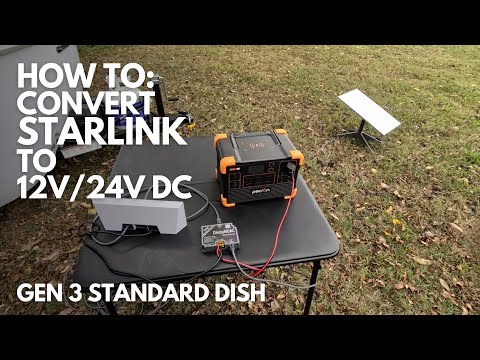
A Victron Starlink setup for the Standard kit is a different job from powering a Starlink Mini. Starlink lists the Standard kit’s average power use at 75 to 100W, and its router runs on 100 to 240V AC. The simplest way to power it from a Victron battery bank is a small Phoenix VE.Direct inverter. A DC conversion can save power but relies on third-party parts.
Electrical work can be dangerous: follow the manual, fuse and size every cable correctly, and use a licensed electrician for anything connected to household wiring.
Victron Starlink Setup: Which Phoenix Inverter?
| Phoenix VE.Direct 120V | Continuous at 25°C | Peak | Zero-load draw (12V) | ECO-mode draw (12V) |
|---|---|---|---|---|
| 12/375 | 375W | 600W for 2s | 6W | 1W |
| 12/500 | 460W | 750W for 3s | 7W | 1W |
| 12/800 | 800W | 1200W for 15s | 8W | 1W |
Source: Victron Phoenix Inverter VE.Direct 250W–1600W 120V datasheet. Output is 120VAC 60Hz with NEMA 5-15R or GFCI outlets.
The 12/375 covers Starlink’s rated average on paper. The 12/500 leaves headroom for a laptop or phone chargers on the same outlet, and it still idles at only 7W. Choose the 12/800 if you also want to run a small appliance.
ECO Mode: Leave It Off for Starlink
In ECO mode, a Phoenix VE.Direct goes to standby when the load falls below a preset level (minimum 15W) and checks for load every 2.5 seconds by default. Starlink draws well above 15W, so it should hold the inverter on. Still, a dish or router that briefly drops its draw could cause a dropout. For an always-on internet connection, the simple choice is to leave ECO mode off and accept the idle draw.
Battery Math (Estimate)
- Starlink at 100W, through an inverter at about 90% efficiency: 100 ÷ 0.9 ≈ 111W from the battery.
- At 12V that’s about 9 to 10A.
- Running for 10 hours: about 95Ah. Running for 24 hours: about 230Ah.
This is an estimate using Starlink’s upper average figure. Measure your real draw with a SmartShunt.
Inverter or DC Conversion?
| Phoenix inverter | DC conversion | |
|---|---|---|
| Parts | Victron inverter, factory Starlink router and cable | Third-party DC power supply and adapters |
| Efficiency | Inverter losses plus the router’s own power supply | Avoids the AC step |
| Best for | Most RVs and vans | Builders squeezing every watt |
If you don’t want to modify anything, use the inverter.
Wiring Checklist
- Fuse the Phoenix positive cable close to the battery and size the cable to the datasheet (8 AWG maximum terminal size on the 12/375 and 12/500).
- Wire a remote on/off switch to the two-pole connector so you can kill Starlink and the inverter together.
Victron’s Phoenix Inverter VE.Direct product page has the full datasheet and manual downloads.
Example: Remote Work Day in a Van
| Device | Power (estimate) | Hours | Energy from battery |
|---|---|---|---|
| Starlink Standard via 12/500 | About 111W | 10 | About 1.1kWh |
| Laptop charger on the same inverter | 60W | 8 | About 0.5kWh |
| Inverter idle overhead (12/500) | 7W | 10 | 0.07kWh |
| Total | About 1.7kWh (about 130Ah at 12.8V) |
Estimates. A 200Ah lithium battery covers a full work day with margin, and a 300–400W solar array can replace most of it on a sunny day.
Saving Power When You’re Not Online
- Switch it off overnight: the remote on/off on the Phoenix makes this one switch. Starlink restarts and reconnects in a few minutes.
- Use a timer: a simple timer on the remote on/off line can turn Starlink off at night and on in the morning.
- Use sleep schedules: the Starlink app offers power-saving sleep schedules for times when you don’t need the connection.
Monitoring the Draw
A SmartShunt on the battery negative shows the exact current Starlink and the inverter draw, in VictronConnect. With a Cerbo GX, you can see it in VRM, track daily usage and set a low-battery alarm, which is handy if you leave Starlink running while away from the van.
Placement and Cabling
- Inverter: mount the Phoenix close to the battery, in a ventilated spot, to keep DC cables short.
- Router: keep it inside, near where you work, and run the Starlink cable from the dish.
- Dish: a clear view of the sky matters more than height; avoid trees and roof obstructions where you can.
Phoenix Inverter Features That Help
- VE.Direct port: connects to a Cerbo GX for remote monitoring.
- Bluetooth (with VE.Direct Bluetooth Smart dongle): settings and status in VictronConnect.
- Pure sine wave output: suits the Starlink router’s power supply and laptop chargers.
- Low-voltage shutdown: protects the battery if you forget to switch off.
Phoenix 12/500 vs Running Starlink on DC
| Phoenix 12/500 | DC conversion | |
|---|---|---|
| Approx. draw at 100W Starlink | About 111W including inverter losses | Somewhat less (estimate) |
| Uses Starlink’s own router | Yes | Depends on the kit |
| Powers a laptop too | Yes, from the same outlet | Needs a separate DC charger |
| Setup effort | Plug and play | Wiring and adapters |
Estimates. For most people, the inverter’s simplicity is worth the small extra draw.
FAQ
Can I use the Starlink Mini guide for a Standard dish?
No. The Mini runs on DC from its own small supply, while the Standard kit uses an AC router.
Will a 12/375 work?
It should cover the rated average, but it leaves little headroom. The 12/500 is safer.
Can I run Starlink and a small fridge on one 12/500?
Possibly, if the fridge’s running and startup draw fit within 460W continuous and the 750W peak. Many 12V compressor fridges are better wired directly to DC.
Does Starlink Standard draw more in cold weather?
Starlink’s dish can use extra power to melt snow, so plan for higher draw in winter and check Starlink’s specifications.
Should I fuse the inverter even for small loads?
Yes. Fuse the Phoenix positive cable close to the battery, sized to the datasheet, whatever the load.
Sources: Victron Phoenix Inverter VE.Direct 250W–1600W 120V datasheet (victronenergy.com, accessed Oct 2026); Starlink Standard Kit specification sheet (starlink.com); DISHYtech, “How to Convert Starlink to 12V DC Power”.
Related: Stargear Starlink Mini 12V to 30V Car Adapter Review, Allwei 1500W Pure Sine Wave Inverter Review, LiTime 12V 50Ah LiFePO4 Battery Review, plus the Victron Energy Guide