



A Victron energy meter ET112 wiring diagram answers two questions. Where does the meter sit in your panel, and how does it talk to the GX device? In an ESS (Energy Storage System) setup, the ET112 measures what flows to and from the grid, so the MultiPlus-II can cut your grid use and, if you allow it, feed power back. Here’s the layout, using Victron’s Energy Meters Selection Guide and MultiPlus-II GX datasheet.
Electrical work can be dangerous: follow the manual, fuse and size every cable correctly, and use a licensed electrician for anything connected to household wiring.
What the ET112 Is For
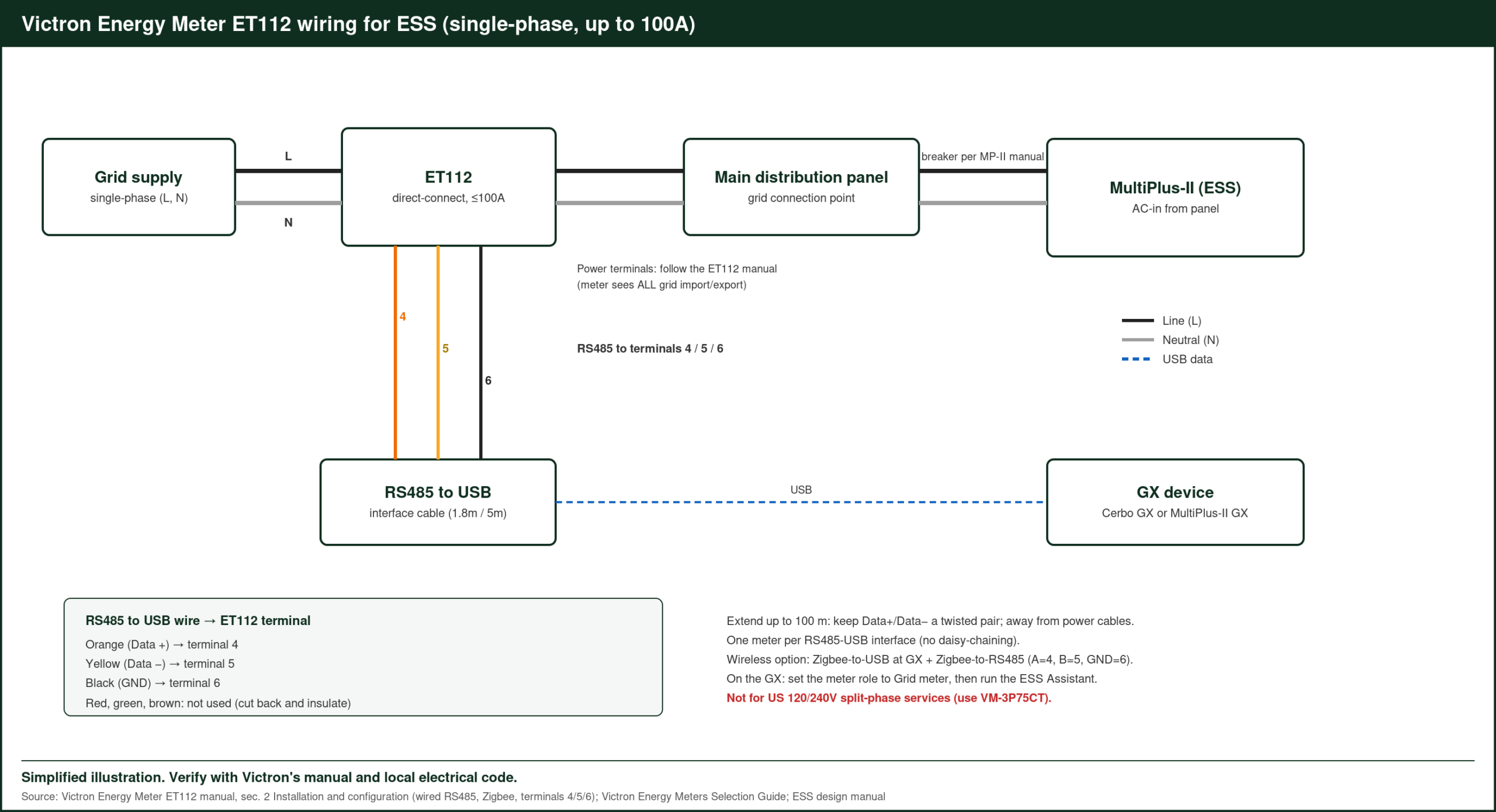
The ET112 is a single-phase, direct-connect meter. Current flows straight through it, up to 100A. Victron’s selection guide lists it for “single-phase up to 100A.” It reaches a GX device over RS485, with a wired RS485-to-USB interface or a wireless Zigbee link.
Victron Energy Meter ET112 Wiring Diagram: The Layout
- Grid supply → ET112 → main distribution panel. Put the meter at the grid connection point so it sees all imports and exports.
- RS485 lines from the ET112 → RS485-to-USB cable → GX device (Cerbo GX, or the built-in GX on a MultiPlus-II GX).
- On the GX: the meter shows up under energy meters. Set its role to Grid meter.
- Run the ESS Assistant on the MultiPlus-II and choose the grid setpoint and feed-in settings.
Follow the ET112 manual for the terminal numbers and the RS485 cabling.
Which Meter Do You Need?
| Situation | Victron’s pick |
|---|---|
| Single-phase, up to 100A | ET112 (or other ET1xx/EM1xx) |
| Single-phase with a PV inverter to measure too | ET340 |
| Three-phase, up to 65A per phase | ET340, EM24, EM540 |
| Split-phase or over 65A | VM-3P75CT (CTs, also for split-phase) |
Source: Victron Energy Meters Selection Guide.
The VM-3P75CT and VM-3P5A connect over VE.Can or Ethernet and need no configuration. That makes them the easier choice for US split-phase homes, where the ET112 doesn’t fit.
Do You Even Need a Meter?
For a simple setup where all your loads are on the MultiPlus-II AC output, you may not. Victron’s MultiPlus-II GX datasheet shows an external 100A current sensor option, and it notes that most PV inverters can be read directly, so you may not need a separate PV meter.
MultiPlus-II GX Feed-In Limits
| Model | Max feed-in |
|---|---|
| 24/3000/70-32 | 3,000VA |
| 48/5000/70-50 | 5,000VA |
Source: MultiPlus-II GX datasheet (230V models).
Grid feed-in needs your utility’s approval and must follow local grid code.
Want the source figures? The energy meters page on Victron’s site has the datasheet.
Worked Example: A 230V Home ESS With Rooftop PV
A 230V single-phase home with a MultiPlus-II 48/5000, a 10kWh lithium battery and an existing grid-tied PV inverter:
- The ET112 sits at the grid connection, so it measures every import and export.
- The GX reads the PV inverter directly where supported, so no extra PV meter is needed.
- With the ESS grid setpoint at a small positive value, such as 50W, the MultiPlus-II discharges just enough to keep grid import close to zero (example setting).
- When the PV produces more than the house uses, the surplus charges the battery first. With feed-in allowed, anything left over flows out up to the configured limit.
Worked Example: An Evening Without the Grid
In that same home, an evening load of 800W for five hours uses about 4kWh. With ESS running, the battery supplies most of it, and the ET112 shows grid import near zero during that time (estimate). If the battery reaches its minimum state of charge, the MultiPlus-II stops discharging and the grid takes over.
Worked Example: The Meter Is Far From the GX
If the main panel is in a garage and the GX is indoors, the RS485 cable can be awkward to route. The wireless option uses a Zigbee-to-RS485 converter at the meter and a Zigbee-to-USB converter at the GX. The GX sees the ET112 as if it were wired.
Setting Up the Meter on the GX
- Connect the ET112’s RS485 terminals to the RS485-to-USB cable, following the terminal numbers in the ET112 manual.
- Plug the USB end into the GX device.
- On the GX, open the energy meter settings and confirm the ET112 is detected.
- Set its role to Grid meter.
- Run the ESS assistant on the MultiPlus-II with VictronConnect or VEConfigure, if not already done.
- Set the grid setpoint, minimum state of charge and feed-in options in the ESS menu.
If the Meter Doesn’t Appear
- Check the RS485 A and B wires aren’t swapped.
- Check the USB cable is plugged into the GX, not a hub without power.
- Confirm the meter is powered and its display shows readings.
- Update the GX firmware.
Reading the Results
Once it’s working, the GX overview shows a grid box with live import or export. In VRM, the consumption and grid charts show how much the battery shifted from evening to daytime, which is the clearest picture of what ESS is doing for the home.
Where It Sits in the Panel
The meter belongs between the utility supply and every circuit you want ESS to control. If some circuits sit before the meter, ESS can’t see them, and the readings won’t match your utility meter. Have the electrician place it right after the main breaker or isolator.
ET112 vs a Current Sensor
For a home where every load can sit on the MultiPlus-II’s AC output, the external 100A current sensor is a simpler option. The ET112 suits homes where many circuits stay on the grid side and ESS needs to see the whole house. If you’re not sure, map which circuits will be on the inverter output first.
FAQ
Can the ET112 measure a US 120/240V service?
No. It’s single-phase. Victron points split-phase systems to the VM-3P75CT.
Can the ET112 connect wirelessly?
Yes. Victron’s guide lists Zigbee-to-USB and Zigbee-to-RS485 converters as a wireless option.
Does the ET112 need its own power supply?
It’s powered from the circuit it measures. Follow the ET112 manual for the voltage connection.
Can I use the ET112 without ESS?
Yes. On a GX device, it can simply monitor grid import and export.
What happens if communication with the meter stops?
ESS needs the meter reading to regulate the grid. Check the GX alarm settings so you’re notified if the meter goes offline.
Can one GX read more than one energy meter?
Yes. Besides the grid meter, a GX can read meters set to other roles, such as a PV inverter meter. Set each meter’s role on the GX.
Sources: Victron Energy Meters Selection Guide; MultiPlus-II GX datasheet, victronenergy.com, accessed Oct 2026.
Related: EcoFlow Delta 3 Max Generator Charging, Allwei 1500W Pure Sine Wave Inverter Review, Klein CL390 Clamp Meter Solar Panel Test, plus the Victron Energy Guide